Visual Brief
Visual Brief makes substantial Claude Code or Codex work easier to comprehend. Instead of another wall of terminal text, it constrains the agent’s update to a concise structure built around progressive disclosure: the essential summary stays visible, while lanes, items, nested details, and evidence expand only when you need them.
Each update is quick to scan during the session and easy to recover after time away. The latest briefing stays prominent, and earlier briefings remain available in a quieter ledger.
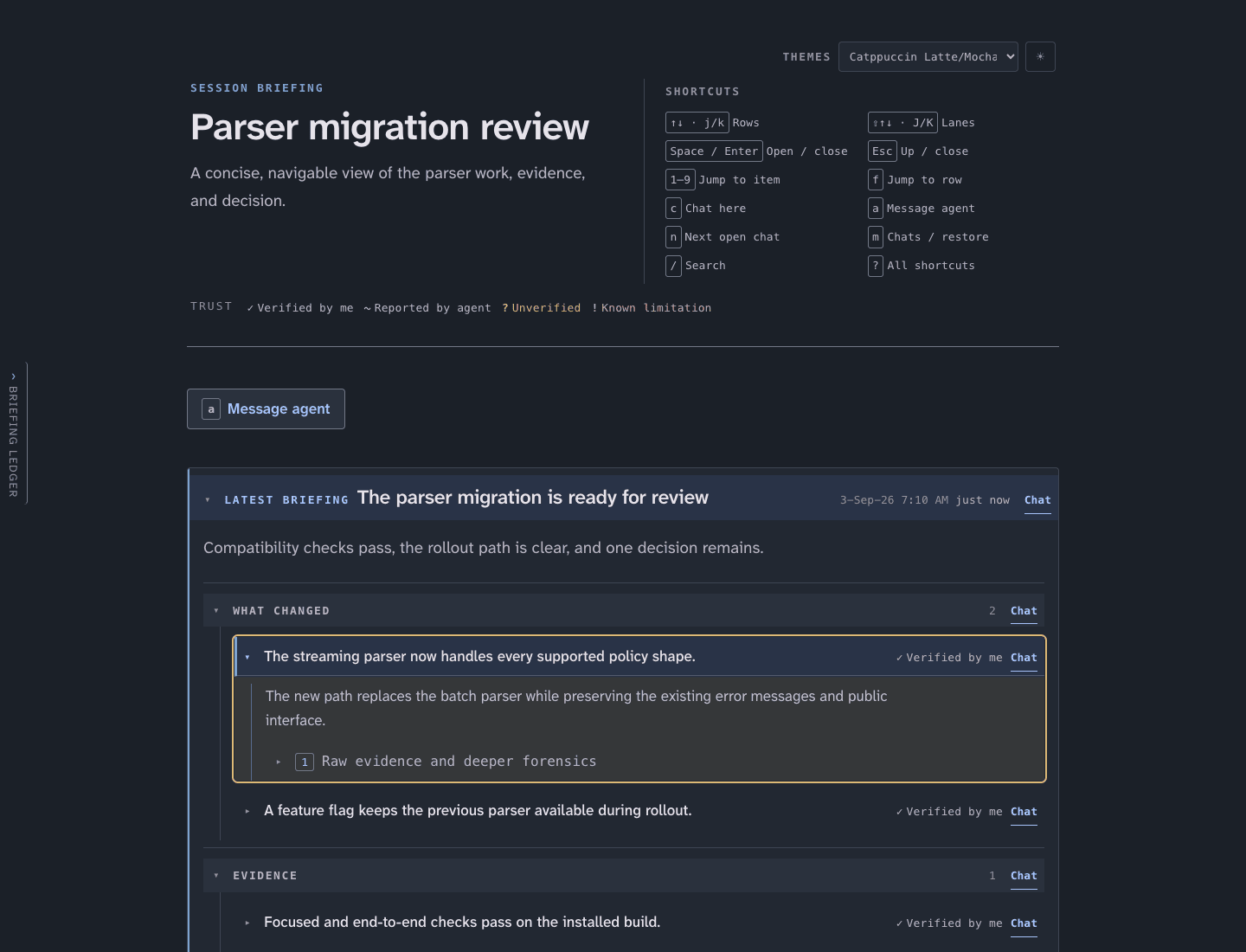
The latest briefing stays prominent while each lane, item, and evidence section opens independently.
It is for meaningful implementation, investigation, review, and design work. Routine progress messages, quick answers, and small fixes belong in the normal agent conversation.
Status
Section titled “Status”Visual Brief 0.1.0 is the initial public release. Its workflows and interfaces may change as the product is used in real long-running sessions.
Install It
Section titled “Install It”Install the provider-neutral CLI once:
uv tool install visual-briefFor the normal agent-driven workflow, also install the Visual Brief plugin for the coding agent you use:
The visual-brief skill alone installs with
npx skills add pchalasani/claude-code-tools -s visual-brief; it works in
Claude Code and Codex, the two agents its question watcher supports. The plugin
adds the milestone-reminder hook:
claude plugin marketplace add pchalasani/claude-code-toolsclaude plugin install visual-brief@cctools-pluginsRestart Claude Code after installation.
codex plugin marketplace add pchalasani/claude-code-toolscodex plugin add visual-brief@cctools-codex-pluginsRestart Codex after installation. Review and trust the hook definition before enabling it.
If the marketplace was added before Visual Brief was published, refresh it before installing:
# Claude Codeclaude plugin marketplace update cctools-plugins
# Codexcodex plugin marketplace upgrade cctools-codex-plugins
The CLI creates, serves, and updates briefings. The plugin gives the agent the Visual Brief skill and adds quiet milestone reminders after the first successful publish. It does not store your work remotely.
Use It Normally
Section titled “Use It Normally”Ask for Visual Brief as part of an ordinary Claude Code or Codex conversation:
Use Visual Brief for this task. Periodically publish a new briefing after each meaningful milestone.
The agent invokes the Visual Brief skill, creates a run, starts or reuses the loopback server, publishes the briefing, and gives you its browser URL. You do not need to run the CLI, start a server, or assemble the structured payload. You can also ask for a single briefing at any point with “Give me a visual brief.”
If you want to reply from the browser in Codex, launch the session with
codex-dynamic instead of plain
codex before making that request. Plain Codex can publish the briefing, but
it cannot receive browser questions as live notifications. Claude Code does
not require a different launcher.
Under the hood, visual-brief serve is a normal long-running CLI process;
visual-brief publish does not start it. The skill makes the agent manage that
process so this implementation detail stays out of the normal user workflow.
Read and Reply in the Browser
Section titled “Read and Reply in the Browser”Visual Brief runs a loopback-only local server and stores its runs on your machine. The briefing page is a local browser page, not a hosted project-management dashboard or a persistent project-state system. It gives an agent a clearer way to present updates that would otherwise scroll past in the terminal.
The page is keyboard-first. Its visible shortcut bar documents navigation, folding, and conversation controls, so the experience stays fast and terminal-like without hiding the controls behind a mouse-only interface.
Ask About Any Part of a Briefing
Section titled “Ask About Any Part of a Briefing”The briefing root, every lane, and every item can hold its own conversation.
Use the arrow keys, j and k, or the numbered shortcuts to select the part
you want to discuss, then press c to open its chat box. You can also click
the row’s Chat control. Type your question and send it with
Command + Enter on macOS or Ctrl +
Enter elsewhere.
When the agent’s watcher is connected, the page keeps your question beside the
selected content, shows when the agent is working, and places the answer in the
same inline thread. This works on the latest briefing and on earlier briefings
in the ledger. Press a, or use the Message agent control above the latest
briefing, when your message is about the session as a whole rather than one
section.
Manual CLI Workflow
Section titled “Manual CLI Workflow”Most users can skip this section. To operate Visual Brief without the agent skill, create a run and start its server yourself:
visual-brief new --label "Review parser changes"visual-brief serve --port 8765new creates the run and prints its local URLs; it does not start the server.
Run the separate serve command in another terminal and leave it running; it
starts the shared loopback daemon. A minimal report.json is:
{ "id": "parser-check", "timestamp": "2026-08-04T12:00:00Z", "headline": "The parser check is complete", "summary": "The focused checks pass.", "lanes": [ { "id": "results", "name": "Results", "items": [ { "id": "focused-checks", "glance": "The focused parser checks pass.", "explanation": "The implementation matches the expected behavior.", "trust": "verified-by-me" } ] } ]}Publish it with visual-brief publish --run <RUN> --file report.json, using the
run ID printed by new.
How Page Questions Reach the Agent
Section titled “How Page Questions Reach the Agent”The skill also arms a watcher before sharing the URL, so questions from the page return to the same running agent session. The provider-specific mechanism is shown below for troubleshooting and manual setups.
Start Claude Code’s persistent monitor:
Monitor( command: "visual-brief watch --agent claude --run <RUN>", description: "questions from the visual-brief page", persistent: true,)Install the claude-code-tools package if codex-dynamic is not already
available:
uv tool install claude-code-toolsLaunch Codex with codex-dynamic,
rather than plain codex, when you want page questions to arrive in the
running session:
codex-dynamicFrom that callback-ready session, start the watcher:
visual-brief watch --agent codex --run <RUN>codex-dynamic starts the normal Codex TUI with the callback bridge that
delivers each Visual Brief question as a live notification. A session
launched with plain codex does not provide that bridge. Obtain approval
to run this trusted watcher outside the default sandbox. Re-arm it after a
session boundary, and stop an existing watcher before starting another one.
The agent folds those messages into the briefing and answers them there, keeping the context beside the update that prompted it. This remains a local, session-oriented briefing flow rather than a replacement for issue tracking or project management.